Custom Product Pages are built on a simple idea: conversion doesn’t depend on the ad alone, but on the consistency between the ad and the App Store product page users land on.
Introduced by Apple in December 2021, Custom Product Pages allow advertisers to create alternative versions of their App Store product page tailored to specific audiences, campaigns, and key moments throughout the year. This guide explains how they work and how to use them to improve your user acquisition performance.
Key Takeaways
- The biggest conversion killer isn’t the ad itself, but the disconnect between the ad and the App Store product page. Custom Product Pages help eliminate that gap.
- Custom Product Pages can improve CPI without increasing media spend, delivering better performance from the same budget.
- Each app can have up to 35 Custom Product Pages, each tailored to a specific audience, campaign, or messaging.
- Combined with Apple Ads, Custom Product Pages create a seamless journey from keyword to ad to App Store product page.
- Users who opt out of tracking can still be directed to a relevant App Store product page, making it easier to deliver a contextual experience.
- Each Custom Product Page has its own performance analytics, making it easy to measure what drives conversions and optimize accordingly.
What are Custom Product Pages (CPP)?
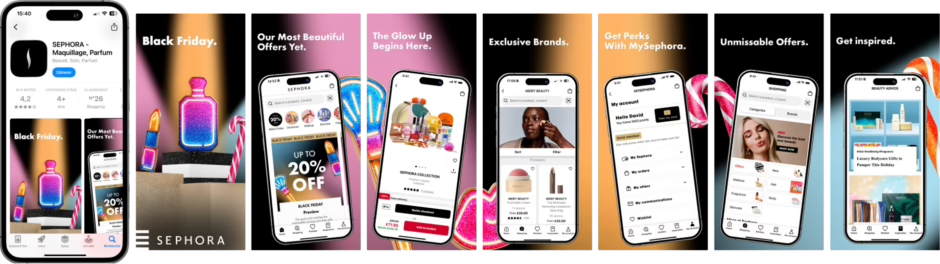
Custom Product Pages (CPPs) are alternative App Store product pages that let advertisers tailor their messaging and creative to specific audiences or campaigns, without making any changes to the app itself.
Each app can have up to 35 Custom Product Pages, each with its own unique URL. Three elements can be customized on each page: screenshots, preview videos, and promotional text. The app name and app icon, however, remain the same across all versions.
Unlike the default App Store product page, Custom Product Pages are not indexed by the App Store. They can only be accessed through a direct link, making them a feature designed for paid acquisition campaigns rather than organic App Store visibility.
Key Features of Custom Product Pages
Custom Product Pages include several features that make them a powerful user acquisition tool:
- Deep linking: After installing the app, users are taken directly to the content highlighted in the Custom Product Page, rather than the app’s home screen.
- Localization: Content can be tailored by market and language, making it easy to deliver localized messaging to international audiences.
- Dedicated analytics: Each Custom Product Page has its own performance data, separate from the default App Store product page.
- Native A/B testing: Test multiple versions of a Custom Product Page within the same campaign to identify which one delivers the highest conversion rate.
Benefits of Custom Product Pages for advertisers
Custom Product Pages improve user acquisition performance by creating consistency between the ad and the App Store product page. When both align, the user journey feels more seamless, leading to higher App Store conversion rates and, ultimately, lower acquisition costs.
- Consistent ad-to-store experience: Matching the ad with the corresponding App Store product page reduces drop-off and improves conversion rates.
- Lower CPI: A product page that reflects the ad users clicked on helps reduce friction between the click and the install, resulting in a lower cost per install.
- Limit ad fatigue: Refresh your App Store creative without changing the default product page, keeping campaigns engaging while maintaining continuity.
- Reach users who opt out of tracking: Even without ad personalization, Custom Product Pages make it possible to deliver a more relevant App Store experience.
- Adapt to seasonal campaigns: Create dedicated product pages for key moments such as holidays, back-to-school, or promotional events without modifying your main App Store listing.
- Improve user retention: Users acquired through messaging that matches their expectations are more likely to engage with the app over time.
- Gain actionable insights: Because each Custom Product Page has its own analytics, you can accurately measure performance, identify what works, and continuously optimize your campaigns.
If you want to know more about how to optimize your App Store campaigns, check out our white paper on ASO.
App Store Custom Product Pages vs. Google Play Custom Store Listings
Both the App Store and Google Play offer customizable product pages, but they differ in terms of features and use cases.
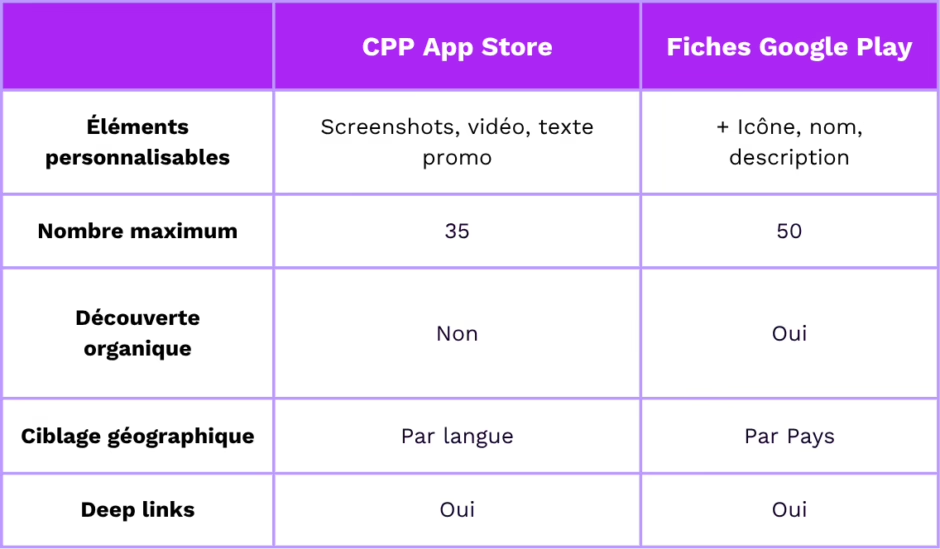
The biggest difference lies in organic visibility: unlike Google Play Custom Store Listings, App Store Custom Product Pages can only be accessed through a direct URL.
On the App Store, Custom Product Pages are designed primarily for paid acquisition campaigns. Both platforms have their strengths: Google Play offers greater creative flexibility, while the App Store focuses on more precise campaign targeting.
Custom Product Pages and Apple Ads: A High-Performing Combination
Custom Product Pages deliver their full potential when paired with Apple Ads. Combining Apple Ads’ precise targeting with a Custom Product Page designed for the same audience creates a seamless experience: the keyword, the ad, and the App Store product page all reinforce the same message.
The Today tab is a good example of this approach. This Apple Ads placement features your ad on the App Store homepage, with a Custom Product Page as the landing page. Because of this, the CPP needs to be be created in advance and incorporated into your campaign planning from the outset.
Example: A fitness app offers both strength training programs and guided meditation sessions. Instead of sending all users to a generic App Store product page, it creates two dedicated Custom Product Pages: one focused on fitness performance, the other on mental wellness. Each page is linked to a separate Apple Ads campaign targeting different search intents. Every user lands on a product page that matches exactly what they were looking for.
Identify the keywords that already perform well in Apple Ads, then build Custom Product Pages around those search intents instead of starting from scratch.
Best Practices for High-Converting Custom Product Pages
To get the most out of your Custom Product Pages, follow these best practices:
1. Let data drive your decisions Start by analyzing high-performing keywords, App Store reviews, and competitor strategies before creating your Custom Product Pages.
2.Optimize your first three screenshots Your first screenshots should immediately reinforce the campaign message. If your ad highlights a specific feature, it should appear in the very first screenshot.
3. Stick to a single CTA per page Each Custom Product Page should have one clear, consistent call to action. Trying to communicate too many messages at once can dilute your message and reduce conversion rates.
4. Go beyond translation Localization isn’t just about language. Adapt your visuals and messaging to the cultural expectations of each market.
5. Use deep links Users who install your app from a Custom Product Page should land directly on the content or feature highlighted in the campaign, rather than having to find it themselves.
6. Measure, learn, and optimize Define success metrics before launch, then monitor conversion rate (CVR), cost per install (CPI), and retention for each Custom Product Page. Continuous optimization should be driven by data, not assumptions
Conclusion
Custom Product Pages are more than just an additional App Store feature, they’re a powerful user acquisition lever. When used effectively, they can help lower CPI, improve user quality, and keep your creative fresh without impacting your default App Store product page.
Their success depends on one key factor: complete consistency between the ad, the Custom Product Page, and the in-app experience. Without that alignment and without ongoing performance measurement, you risk missing much of their potential.
At Addict Mobile, we integrate Custom Product Pages into a broader user acquisition strategy, from creative production to Apple Ads campaign optimization. Get in touch with our team to learn how we can help you maximize their impact.
FAQ
What's the difference between a Custom Product Page and the default App Store product page?
The default App Store product page is your app’s main listing, visible to all users browsing the App Store. A Custom Product Page is an alternative version of that listing, with tailored creative and messaging for a specific audience or campaign. It can only be accessed through a unique URL and isn’t discoverable through App Store search.
Can you use Custom Product Pages without Apple Ads?
Yes. Custom Product Pages can be used as landing pages for any paid campaign that supports unique URLs, including Meta, TikTok, influencer marketing campaigns, and email campaigns. That said, Apple Ads remains the most effective channel for unlocking their full potential, thanks to its highly precise targeting capabilities.
How many Custom Product Pages should you create to get started?
There’s no one-size-fits-all answer. A good starting point is to identify two or three distinct audience segments or your highest-traffic campaigns, then create a dedicated Custom Product Page for each. The goal is to test, measure, and iterate before scaling your strategy.
Do Custom Product Pages affect an app's organic App Store ranking?
Not directly. Custom Product Pages aren’t indexed by the App Store and don’t influence an app’s organic ranking. However, by improving conversion rates and the quality of users acquired through paid campaigns, they can indirectly strengthen the signals the App Store algorithm takes into account.
How can you tell if your Custom Product Page is performing well?
Each Custom Product Page has its own dedicated analytics in App Store Connect. The key metrics to monitor are conversion rate (CVR), cost per install (CPI), and user retention for users acquired through that page. Comparing these results with your default App Store product page and other Custom Product Pages helps identify what works best and continuously optimize performance.